GroupSource requires the original, signed Enrollment Card for an employee in the event of a Life, AD&D, ASI, Dependent Life or Critical illness claim in order to verify that the listed beneficiaries are valid. If the original card with the employee’s signature cannot be produced—or if only a copy is available—the claim payment may be delayed, or the claim may be paid to the member’s estate instead of their designated beneficiary.
If the original Enrollment Card is not available, the employee’s signature on the Summary Sheet generated by WEBS is considered valid. To generate an Employee Summary Sheet in WEBS, please do the following:
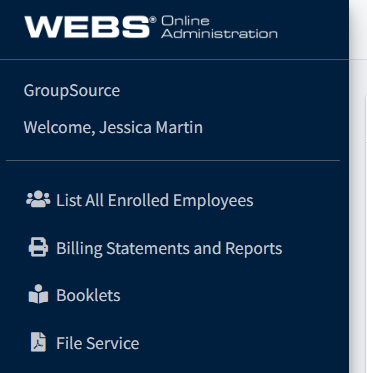
Navigate to the List All Enrolled Employees screen in WEBS, using the menu:
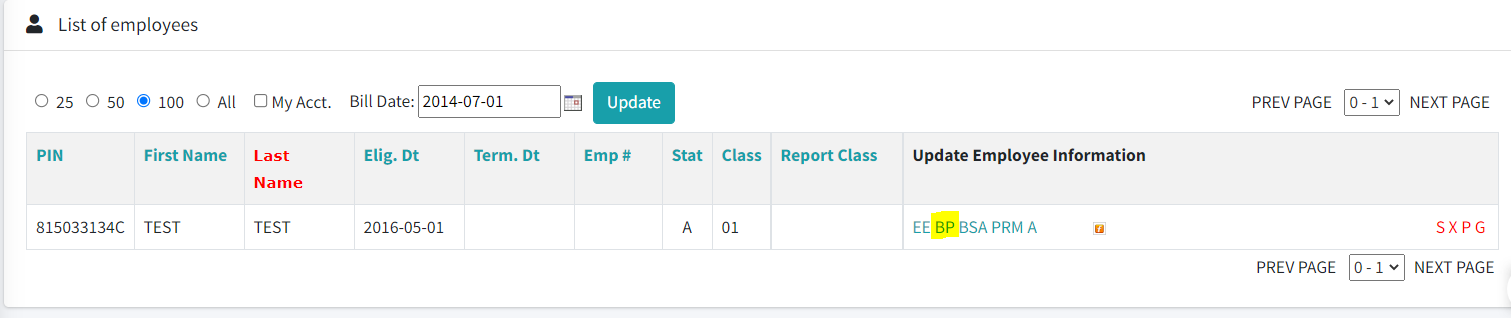
Locate the correct employee from the list and open their Benefits Profile screen by clicking on the BP link to the right of their name:
Scroll to the bottom of the Benefits Profile screen and click the Print Summary button:

Open the generated PDF. Print a hard copy of the signature and have the employee review all information to ensure it is correct. If no changes are required, have the employee sign in ink on all fields indicated. Ensure that you maintain the original copy with signature on your files.